
Generate Aircel UPC Code Online
Do you want to Port Out from Aircel (MNP)? But facing issues in generating Aircel UPC Code? UPC Generation Pages of Aircel not responding or not working? Well, here we have a straightforward working way to generate Aircel UPC Code Online using Aircel UPC Generation Page (https://ekyc.aircel.com:444/ekyc/genupc.html).
Yes, you read it correctly. We have got two to three working UPC Generation Page for Aircel using which you can easily generate UPC Code for Aircel and Port Out without any Hassle. Just check the guide below to generate Aircel UPC Code Online from Official Website easily without facing any issues.

Here is the method to generate UPC Code online from Aircel Official Website.
Requirements
- Aircel Mobile Number
- Aircel Sim Card (Working or Non-Working Condition)
- Aircel Sim Serial Number (written on the SIM card)
So in order to generate Aircel UPC Code online (MNP Online) through Aircel UPC Generation Page (Official), we need two main things, Aircel Mobile Number and it’s Sim Number (that you can see on the SIM card). Just follow the steps below to find and get your Aircel Sim Serial Number and then generate Aircel UPC from Aircel eKYC Online Website.
Steps to Generate Aircel UPC Code Online from EKYC.AIRCEL.COM
Step 1: Firstly visit any one of the given Aircel UPC Generation Page –
Step 2: You will get a form with 2 to 3 fields.
- First Field: Enter your Aircel Mobile Number in the first field.
- Second Field: Enter the Last 5 Digits of your Aircel Sim Number. (We copied it from Aircel Sim Reader App, so just paste it here)
- Third Field (Second Link): Select your Circle/State in which you have that Aircel Sim.
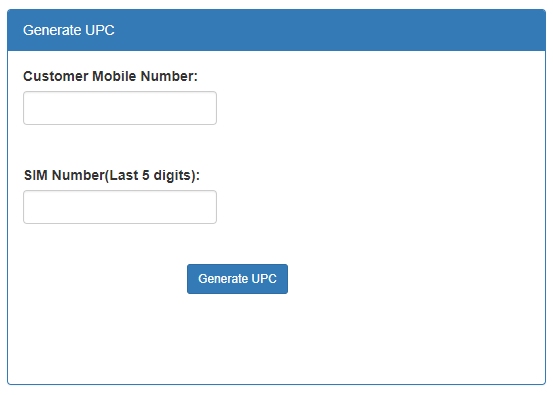
Step 3: Now just click on Generate UPC button and on the same page, you will get your Aircel UPC Code.
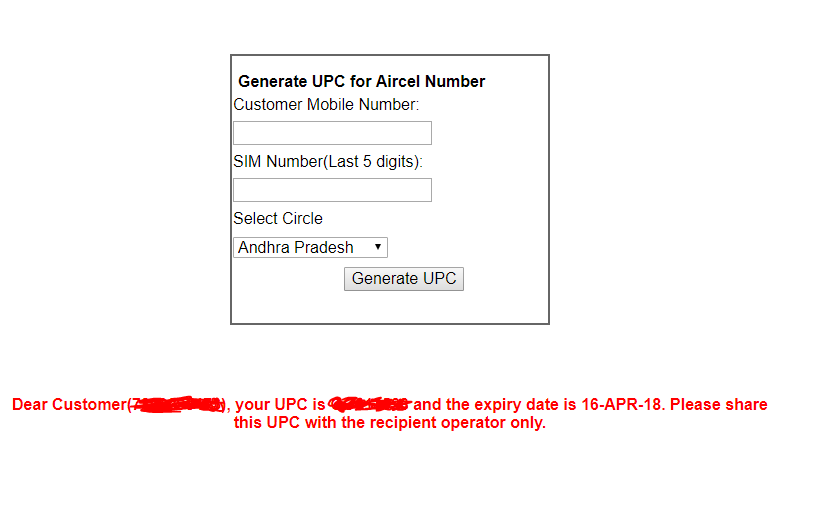
Note: Make sure that the information you submit is correct. Sometimes, Aircel UPC Generation Page gives errors like Sim Info Mismatch, Couldn’t Fetch Customer Details, etc. In such cases, you just have to keep retrying.
Step 4: That’s it. Once you get your UPC, just make note of it and proceed ahead to Port your Aircel Number to any other Network of your Choice (Airtel, Idea, Jio, Vodafone, Telenor, Tata Docomo, etc.)
Getting Incorrect UPC Code?
Most of the readers are claiming that they are getting incorrect UPC Code. Well, not to worry because the UPC Code is correct, just the first 2 digits may be mismatched. The first 2 digits of the UPC Code has to match the respective circle/state codes.
Check the First 2 Digits of your Circle/State (list given below) and try to match it with the UPC Code you got. If it doesn’t match then just replace your UPC first 2 digits with the digits given in the list as per your Circle/State.
The resulted UPC will be working UPC Code and you can try it again to Port Out.
| Circle (State) | First 2 Digits of UPC |
|---|---|
| Andhra Pradesh | DA |
| Assam | DS |
| Bihar | DB |
| Chennai | DT |
| Delhi | DD |
| Gujarat | DG |
| Haryana | DH |
| Himachal Pradesh | DI |
| Jammu & Kashmir | DJ |
| Karnataka | DX |
| Kerala | DL |
| Kolkata | DK |
| Madhya Pradesh | DY |
| Maharashtra | DZ |
| Mumbai | DM |
| North East | DN |
| Orissa | DO |
| Punjab | DP |
| Rajasthan | DR |
| Tamil Nadu | DT |
| UP-East | DE |
| UP-West | DW |
| West Bengal | DV |
