
Copy from Restricted Website — Hello guys, many a times we visit some websites, which contain very useful information for us, but the thing is that we cannot copy any data or text from that site. And we need that data to copied. Most bloggers and webmasters uses JavaScript technique to disable right-click, to prevent scrapers sites from stealing their content. In this case, we have shared this article with you which will help you copy any data from any website

Use of Chrome Extension Allow Select and Copy
Google Chrome is offering an extension named "Allow Select And Copy"
Moreover we are sharing 3 best ways to copy text from right click disable webpages:
- By disabling browser JavaScript in browser
- Using Proxy Sites
- By Using the source code of the site
Also Read : Top 3 Websites for Online Earning
Disabling JavaScript in Browsers [Google Chrome]
In Chrome browser, you can quickly disable JavaScript by going to settings. See the screenshot for better explanation:
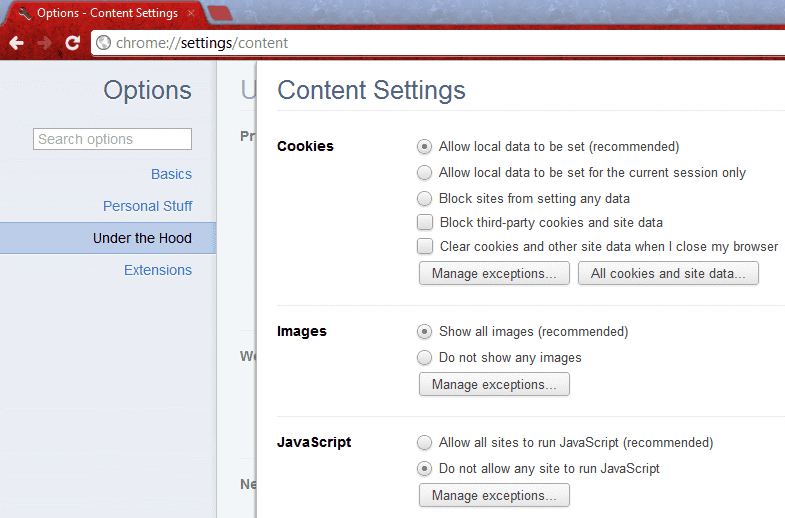
- Goto Setting >> UnderHood Tab >> Content Settings
- or enter chrome://settings/content
- Then Select Do not allow any site to run JavaScript
Similarly if you are using Firefox, you can remove the tick from “Enable JavaScript” option.
Using Proxy Sites
There are many proxy sites, which let you disable JS while browsing. All you need to use those proxy sites, which offer such features and you can quickly use right-click on click disabled sites.

By Viewing Source Code
If you have to copy the specific text content and you can take care of HTML tags, you can use browser view source options. All the major browser give an option to the source of the page, which you can access directly using the format below or by right click. Since right click is out of the question here, we will simply open chrome browser and type: view-source: before the post URL Like
- view-source:https://www.nvtechmania.com/
And find the paragraph or text you want to copy and then paste it into any text editor.
Also Read : Top 6 Best UPI Apps to earn money in India
Use of External Site :
All the above tips i hope you liked them. Here is another way where you will be using an external website which allows you to copy text. This is made only for this special purpose. Yes we are talking of the site www.allowcopy.com
- Click open this link and paste the required link in the space provided.

- Click on Submit
- Close any popups
- Now copy your required texts
