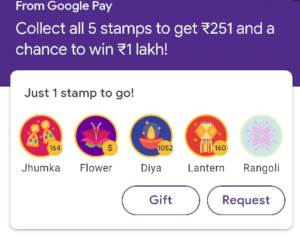
Google Pay Diwali Scanner Collect Stamps Offer, Diwali With Google Pay, Google Pay Diwali Scanner Offer, Google Pay Diwali Collect 5 Stamps Offer – From this Offer, Users have to Collect Total 5 Stamps by Scanning Diwali Scanner, By Gifting Friends, and By Requesting Gifts from your Friends! Here i will explain your full Method to Collect All 5 Stamps Of Jhumka, Flower, Diya, Lantren, Rangoli Using this Method.
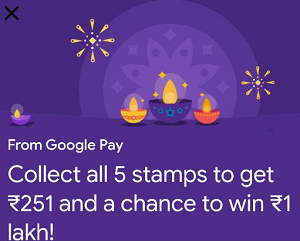
What is Diwali With Google Pay Offer? :
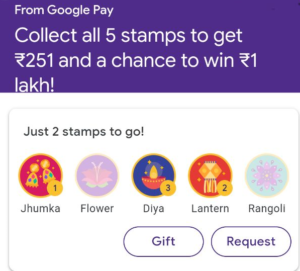
“Collect all 5 stamps and earn ₹251 and a Diwali Bonus ticket that could win you ₹1 lakh in a lucky draw.”
If you don't have the Google Pay app, Download it here : DOWNLOAD
Also read : [Trick] How To Get Rangoli or Flower In Google Pay Diwali Scanner
1. There are total 5 different stamps and 3 methods to collect them stamps.
2. You can Collect Maximum 5 Stamps using each method.
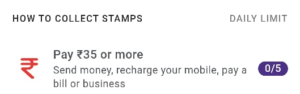
3. Use Google Pay to send money or make any form of payment of ₹35 or more (Currently Not Active)
4. Scan Stamps Using Diwali Scanner. (Only For Android Users)
5. Gift a stamp to a friend. You can earn up to 1 bonus stamp per friend. So If you Gift To Your Friend Then You Will Get 1 Extra Stamp. (Give and Get)
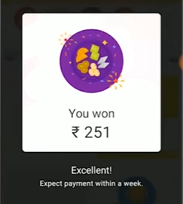
6. So, Collect all 5 Stamps and Get Get ₹251 In Bank From Google Pay.
7. Collect all 5 different stamps by 31 Oct 2019 11:59 pm to win prizes.
8. Stamps are given out randomly. You could get any one of the 5 different stamps through the 3 collection methods.
9. User collect up to 15 stamps a day, with a limit of 5 stamps per collection method.
10. The more you pay friends and businesses with Google Pay, the more stamps you collect.
How To Use And Collect 5 Stamps Using Google Pay Diwali Offer? :
1. First of All Update your Google App : UPDATE NOW
2. This offer is by Invitation Only So Just Open Given Link After Updating your Google Pay App. :
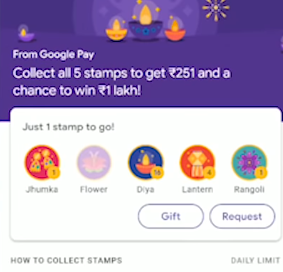
3. After Tapping on Above Link You will able to See a Diwali Gateway Like below.

4. Now you have to Send a Gift to Me So Just Tap on any Stamp.
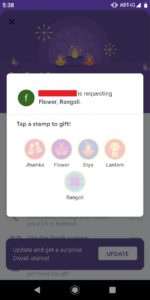
5. User will get one Surprise Stamp.
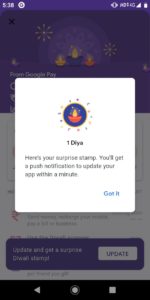
6. First Way – Now Get Back to the Dashboard and Go Downwards and You will able to see Diwali Scanner Option. Tap On It.
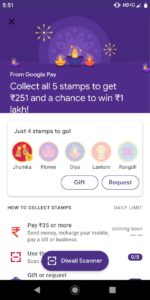
7. Must have another Phone / PC for This. Now Search Jhumka, Flower, Diya, Lantren, Rangoli in Google in another Phone and Scan 5 Times to Get Different Stamps.
NOTE : You can Scan Only 5 Times A Day.
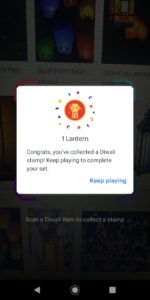
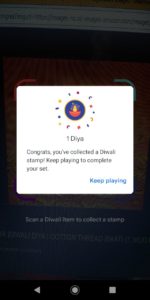
8. Second Way – After Scanning 5 Times, Now Gift Your Collected Stamps 5 Times. Don’t Worry when you Gift Stamps, you will Receive Different Stamps too.
9. Third Way – To Send Money, Recharge, Or Bill Payment Worth Rs.35 Or More. (Coming Soon) (Not activated till Now So Don’t Try This)
10. Right Now You can Collect or Gift Total 10 stamps in a Day. You can Try Again Tomorrow.
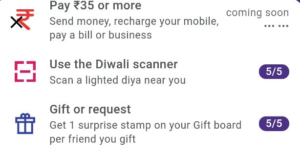
11. If you have Extra Stamps then You can Giveaway to Your Friends and When you Collect all 5 Stamps you will Get ₹251 In Bank Instantly and Scratch Card Worth 1 Lakh.
Terms & Conditions :
- You must successfully complete the following actions to be rewarded with a stamp:
- Use Google Pay to send money or make any form of payment of Indian Rupees Thirty Five or more
- Scan a lighted Diwali diya near you using the Diwali Scanner
- This feature is only available on Android devices
- Gift a stamp to a friend. You can earn up to 1 bonus stamp per friend
- Each Google Pay Customer can only use one set of Google Pay credentials, which includes but is not limited to a Google account, phone number and form of payment, to qualify for the offer. Any of these unique Google Pay credentials must not have been used to register another Google Pay Account.
- P2P payments to external UPI IDs and inbound-transfers from non-Google Pay users are not eligible for this offer.
- You can collect a maximum of 5 stamps per day through each collection method.
- For collecting at least one each of five different stamps, you will receive a scratch card with a guaranteed reward worth Indian Rupees Two Hundred and Fifty One (INR 251) and a Diwali Bonus ticket which is a lucky draw ticket worth up to India Rupees One Lakh (INR 1 Lakh) that unlocks on 1 November 2019.
- You can earn a maximum of one scratch card and one Diwali Bonus ticket during the offer period. After earning your reward, you can still continue to collect stamps throughout the offer period and gift them to your friends.
- If you or your friends cannot see the stamp collection feature on your Google Pay Rewards channel, update your app to the latest version.
- You are not eligible for this offer if you have already earned over Indian Rupees Nine Thousand (INR 9,000) during this current fiscal year (1 April to 31 March) across all Google Pay offers.
- In addition, if you win a One Lakh (1,00,000) reward through this offer, you will no longer be eligible for any other Google Pay offers for the remainder of the fiscal year.
- If you earn the winning prize of Indian Rupees One Lakh (INR 1,00,000), when claiming your prize, you will need to provide your permanent account number and any other documents that Google may require for tax purposes.
- Offer valid until 31 October 2019.
- By accepting a prize, you agree that Google may use your name and image for advertising and promotional purposes, without additional consent from or compensation to you.
- If you earn a reward, your reward money will be deposited into your bank account. As such, you must have a UPI-enabled savings account attached to your Google Pay account to receive payment from Google. Please be sure to link your UPI enabled savings account to your Google Pay account within 45 days of claiming the reward, failing which the reward will be deemed to be forfeited.
- Employees, interns, contractors and office-holders, as well as their immediate families (parents, siblings, children, spouses and life partners of each, regardless of where they live) of Google LLC, its affiliates and subsidiaries, and any representatives or agencies of Google or other persons professionally connected with the offer, are not eligible to participate.
- This offer is not available to residents of the state of Tamil Nadu (as per Tamil Nadu Prize Scheme (Prohibition) Act 1979) and wherever else prohibited by Law. Residents of these states should not participate in this offer.